
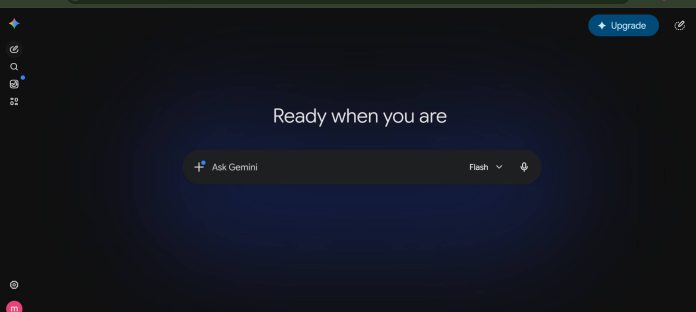
Description
Google Gemini is a multimodal AI assistant built by Google for writing, research, coding, and everyday productivity tasks. It runs as a standalone app on web, Android, iOS, and macOS, and integrates directly into Gmail, Docs, Drive, and Chrome for paid subscribers. Gemini processes text, images, audio, and video within a single conversation, and its underlying Gemini 3 models support a one million token context window through the Gemini API. Free users get access to Gemini 3.5 Flash with limited access to Gemini 3.1 Pro, while paid plans raise usage limits and unlock features like Deep Research, video generation through Google Flow, and Gemini in Chrome. Developers can build on the same models through the Gemini API and Google AI Studio. Students, researchers, developers, and Google Workspace users make up the core audience, since much of Gemini’s value comes from its integration across Google’s existing products.
Key Features
- Multimodal chat — understands text, images, audio, and video in one conversation.
- Deep Research — runs multi-step web research and compiles a structured report.
- Gemini Live — voice conversation mode with real time screen and camera sharing.
- Canvas — interactive workspace for drafting documents, code, and web pages.
- Image and video generation — creates and edits images and video through Nano Banana and Gemini Omni.
- Gems — custom chatbot personas configured with saved instructions.
- Gemini in Chrome — browser assistant that reads the current page and answers questions.
How It Works
Users sign in with a Google Account at gemini.google.com or through the mobile and macOS apps. The main interface is a chat window where prompts can include typed text, voice input, uploaded files, or images. Selecting Thinking from the model selector switches to Gemini 3 Pro for complex reasoning, while default requests run on faster Flash models. Canvas opens a side panel for drafting and editing documents, code, or web prototypes generated from a prompt. Gemini Live starts a real time voice session that can reference the phone camera or a shared screen. Responses appear inline in the chat and can include generated images, code blocks, or interactive layouts, with completed work stored in a My Stuff folder inside the app.
Technical Architecture & Overview
- Core Engine: Gemini 3 Pro and Gemini 3 Flash power the consumer app; developers reach the same family, plus Gemini 2.5 Pro and Flash, through the Gemini API.
- Deployment: Browser-based web app, native Android and iOS apps, a native macOS app, and a Chrome browser extension. Cloud-hosted, with no on-prem or local inference option.
- API Surface: REST API and SDKs documented at ai.google.dev, with per-project rate limits tied to a Free, Tier 1, Tier 2, or Tier 3 usage tier based on cumulative billing spend.
- Known Limits: Gemini 3 models carry a documented 1 million token input context window and up to 64,000 output tokens, with a knowledge cutoff of January 2025. Consumer app context length varies by plan and is not separately published.
Pros & Cons
| Pros | Cons |
|---|---|
| Free plan available at no cost, including limited access to Gemini 3.1 Pro | No on-premises or local deployment option for the consumer app |
| Multimodal input covering text, images, audio, and video in one conversation | Gemini in Chrome and Gemini Agent are limited to Pro and Ultra subscribers in the U.S. at launch |
| Deep integration with Gmail, Docs, Drive, and other Google Workspace apps on paid plans | Jules, the asynchronous coding agent, currently supports English only |
| 1 million token context window on Gemini 3 models through the API | Exact context window for the free consumer app tier is not separately published |
| Native apps for web, Android, iOS, and macOS | Google AI Ultra’s higher usage tier reaches $199.99 per month |
Pricing
| Plan | Price |
|---|---|
| Free | $0 / month |
| Google AI Plus | $4.99 / month |
| Google AI Pro | $19.99 / month |
| Google AI Ultra | $99.99 / month (5x Pro limits) or $199.99 / month (20x Pro limits) |
Pricing verified on July 4, 2026: https://gemini.google/subscriptions/
Platform Availability
Web | Android | iOS | macOS | API
Best For
Students | Researchers | Writers | Developers | Google Workspace users
Frequently Asked Questions
Is Google Gemini free to use?
Yes. Gemini offers a free plan at $0 per month with a Google Account, including access to Gemini 3.5 Flash and limited access to Gemini 3.1 Pro. Paid Google AI Plus, Pro, and Ultra plans raise usage limits and unlock additional features.
How much does Google AI Ultra cost?
Google AI Ultra starts at $99.99 per month for 5 times higher usage limits than the Pro plan, or $199.99 per month for 20 times higher limits, plus early access to features like Deep Think and Gemini Spark.
What is the context window for Gemini’s API models?
Gemini 3 models support a 1 million token input context window and up to 64,000 output tokens, per Google’s developer documentation. The consumer app’s context length varies by subscription plan and is not separately published.
How does Google Gemini differ from ChatGPT?
Gemini integrates natively into Gmail, Docs, and Drive for Google Account holders, while ChatGPT runs as a separate app with its own plugin ecosystem. Both offer free tiers and paid subscriptions with higher usage limits.
Can developers build with the same models that power the Gemini app?
Yes. The Gemini API and Google AI Studio give developers access to the same model family used in the consumer app, including Gemini 3 Pro and Gemini 3 Flash, with usage-based pricing documented at ai.google.dev.
Similar Tools in This Directory
Also in this directory: ChatGPT, OpenAI’s assistant with bundled Codex access | Claude by Anthropic, coding agent bundled into every paid plan | Meta AI, free assistant built into Facebook, Instagram, WhatsApp | Grok by xAI, real-time X and web search built into chat | Perplexity AI, cited-answer research engine | Kimi AI, Moonshot’s agentic workspace with a free tier | GLM AI, Zhipu’s free chat backed by open models





