
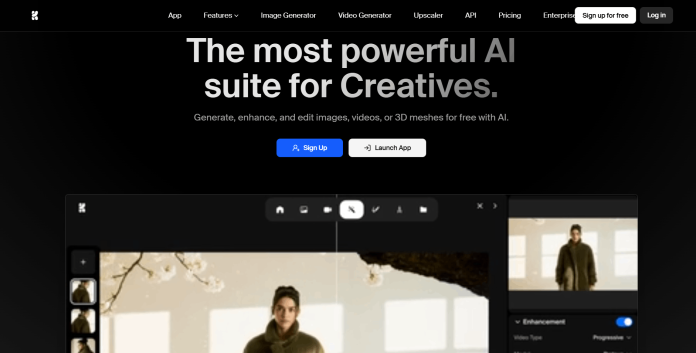
Description
Krea is a browser-based creative suite, trusted by 40 million subscribers, that generates and edits images, video, and 3D content using dozens of AI models in one workspace. Its best-known feature is Realtime Canvas, which renders photorealistic images as a user sketches or types rather than waiting for a full generation cycle. Every plan draws from a shared pool of compute units, spent at different rates depending on which model is used, a Krea 2 image costs far fewer units than a premium model like Nano Banana Pro or Veo 3. The Free plan gives 100 units a day with limited access across categories and no commercial license, while Basic, Pro, and Max raise the monthly unit pool, unlock full model access, and add a worldwide commercial license, LoRA fine-tuning, and upscaling up to 22K. Business and Enterprise plans cover up to 50 seats at one flat price with SSO, admin roles, and custom legal terms. It suits designers, architects, and creative teams who want real-time iteration and access to a wide model roster inside one subscription rather than several separate tools.
Key Features
- Realtime Canvas — renders images live as a user sketches or types, rather than waiting for a full generation.
- Dozens of AI models — image, video, 3D, and lipsync models including Krea 2, Nano Banana Pro, Flux, Veo 3, Kling, and Sora-class options.
- LoRA fine-tuning — train custom models on Basic and above, with training volume scaling by plan.
- High-resolution upscaling — up to 2K on Free, scaling to 22K on paid plans via Topaz-class upscalers.
- Krea Nodes and App Builder — build reusable, shareable workflows by connecting models and processing steps visually.
- Commercial license — included from Basic upward for marketing, product, and client work.
- Team and enterprise controls — SSO, admin roles, per-member spend limits, and audit logs on Business and Enterprise.
How It Works
Users pick a model from Krea’s roster, image, video, 3D, or a real-time canvas, and generate directly in the browser, with results drawing from one shared monthly compute-unit pool rather than separate per-model limits. Cheaper in-house models like Krea 2 or Z-Image consume relatively few units per output, while premium licensed models like Nano Banana Pro, Veo 3, or Kling cost significantly more per generation, so the same unit pool stretches further or less depending on which models a workflow relies on. Higher tiers raise the monthly unit allowance, generation concurrency (how many outputs can run at once), and unlock the full model roster; Free is capped at 1 image and 0 concurrent videos, while Pro allows 8 concurrent images and 4 videos. Krea Nodes lets users chain models and processing steps into a reusable visual workflow, which can then be turned into a shareable App via App Builder. Business and Enterprise plans extend the same product to teams, covering up to 50 seats under one flat price with admin controls and compliance features layered on top.
Technical Architecture & Overview
- Core Engine: Krea’s own Krea 2 and Krea 1 models, combined with licensed access to dozens of third-party image, video, 3D, and lipsync models.
- Deployment: Browser-based web app at krea.ai; a native iOS app is also available.
- API Surface: A separate API and model-licensing pricing structure exists outside the consumer subscription plans, documented on Krea’s own API pricing page.
- Known Limits: Compute units do not roll over on Basic, Pro, or Max (Business and Enterprise can); generation concurrency and upscale resolution are both capped by plan, from 1 image/0 video concurrency on Free up to unlimited on Max and above.
Pros & Cons
| Pros | Cons |
|---|---|
| Realtime Canvas renders results live as you sketch or type, a genuinely distinct feature versus most competing platforms | Free plan has no commercial license and limited access across image, video, 3D, and lipsync categories |
| Access to dozens of image, video, 3D, and lipsync models through one shared subscription | Compute units are spent at very different rates by model, so effective value depends heavily on which models a workflow uses |
| Upscaling reaches up to 22K resolution on paid plans, well beyond most competing tools | Compute units don’t roll over month to month on Basic, Pro, or Max plans |
| Krea Nodes and App Builder let users turn a workflow into a reusable, shareable app rather than one-off generations | Full access to all video models (including Veo 3, Sora, and Kling) only unlocks on Pro; Basic gets selected video models only |
| Business plan covers up to 50 seats at one flat price rather than charging per seat | Annual billing (40% off) is needed to reach the advertised monthly-equivalent prices; monthly billing costs more |
Pricing
| Plan | Price |
|---|---|
| Free | $0/month (100 compute units/day) |
| Pro (most popular) | $21/month billed annually (20,000 units/month) |
| Max | $63/month billed annually (60,000 units/month) |
Platform Availability
Web | iOS | API
Best For
Designers | Architects and interior designers | Creative teams | Real-time ideation workflows
Frequently Asked Questions
Does Krea AI have a free plan?
Yes. Krea’s Free plan gives 100 compute units per day with limited access across image, video, 3D, and lipsync models, and no commercial license, according to Krea’s official pricing page.
How much does Krea AI cost?
Paid plans run from $5.25/month (Basic) to $63/month (Max) billed annually, with Business at $160/month for up to 50 seats and custom Enterprise pricing above that, per Krea’s official pricing page.
Do Krea compute units roll over?
Not on Basic, Pro, or Max; unused monthly units are lost at the end of the billing cycle. Business and Enterprise plans do support rollovers, according to Krea’s official FAQ.
Which Krea plan includes a commercial license?
Basic and above. The Free plan does not include a commercial license, so any income-generating use requires at least the Basic plan, per Krea’s official plan comparison.
What is Realtime Canvas?
Realtime Canvas is Krea’s live image-generation feature that renders results as a user sketches or types, rather than requiring a full separate generation step, and is included even on the Free plan with limited daily usage.
Similar Tools in This Directory
Also worth comparing: Nano Banana Pro, Google’s studio-quality image model | Playground AI, browser-based image generation and design canvas | Getimg.ai, multi-model image, video, and audio platform | Leonardo.AI, fine-tuned, token-metered image and video generator





