
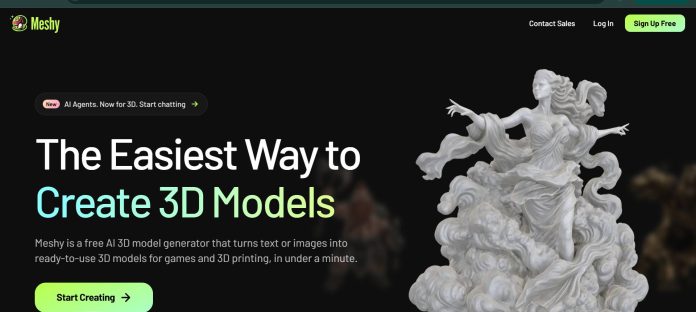
Description
Meshy is an AI 3D modeling platform that turns text descriptions, 2D images, and conversational prompts into production-ready 3D assets, currently powered by its Meshy 6 model (with Meshy 4 and 5 still available). Text to 3D generates a textured model from a written description in about a minute, while Image to 3D infers 3D structure from a single reference image in a similar timeframe. Beyond generation, Meshy covers AI texturing with PBR materials, remeshing, auto-rigging with a 600-plus motion library, and export to seven formats plus plugins for common 3D tools. A REST API and MCP server expose the full pipeline to developers and AI coding agents like Cursor and Claude Code.
Key Features
- Text to 3D — generates a textured 3D model from a written description, up to 800 characters, in about a minute.
- Image to 3D — infers 3D structure from a single reference image and produces a model in under a minute.
- AI Texturing — applies PBR materials and up to 4K textures to a model.
- Auto-rigging and animation — rigs a model automatically and applies motion from a 600-plus animation library, free on every plan.
- Meshy API and MCP Server — exposes text-to-3D, image-to-3D, texturing, remeshing, and animation to developers and AI coding agents.
- 7 export formats — plus 8 DCC Bridge plugins and direct 3D-printing integration.
How It Works
A user describes an object in natural language, up to 800 characters, and picks a model version (Meshy 4, 5, or 6), a model type (Standard or Low Poly), and a pose before generating; each generation costs 20 credits and returns a rotatable 3D model in about a minute. Starting from an image instead skips straight to inferring the 3D structure from that reference. From there, texturing is a separate step that applies PBR materials, and a finished model can be auto-rigged and animated using Meshy’s built-in motion library at no extra cost. Developers can skip the web workspace entirely and drive the same pipeline through the Meshy API or, for AI coding agents, the MCP server.
Technical Architecture & Overview
- Core Engine: Meshy’s proprietary Meshy 6 model, with Meshy 4 and 5 also available.
- Deployment: Browser-based web app; plugins for common 3D tools; iOS/desktop presence not confirmed on the official site.
- API Surface: REST API covering the full generation pipeline, plus an MCP server for AI-agent integration (Cursor, Claude Code, Claude Desktop).
- Known Limits: Each generation costs 20 credits; the Free plan’s 100 monthly credits limit output to a handful of models a month.
Pros & Cons
| Pros | Cons |
|---|---|
| Auto-rigging and the 600-plus motion library are free on every plan, including Free. | Each generation costs 20 credits, so the 100 free monthly credits go quickly. |
| The MCP server lets AI coding agents like Cursor and Claude Code drive 3D generation directly. | Higher output volume and priority generation require the Premium or Ultra tier. |
| Seven export formats and eight DCC Bridge plugins cover most common 3D pipelines. | Texturing is billed as a separate step from generation, adding to the credit cost. |
| Both text-to-3D and image-to-3D generations return a model in about a minute. | Older model versions (Meshy 4/5) remain available but the newest quality sits with Meshy 6. |
| Direct 3D-printing integration removes manual file export and transfer steps. | Advanced workflows like AI agents are positioned toward the top Ultra tier. |
Pricing
| Plan | Price |
|---|---|
| Free | $0/month |
| Pro | $20/month (individual creators) |
| Premium | $40/month (high-volume creators) |
Platform Availability
Web | API | MCP Server
Best For
Game developers and 3D artists prototyping characters and props | Makers and hobbyists creating models for 3D printing | Developers and AI agent builders automating 3D generation via API or MCP
Similar Tools in This Directory
Also worth comparing: 3D AI Studio, a multi-model text and image to 3D platform with Flow pipelines | Hyper3D, a native 3D generative AI model with enterprise SSO and team collaboration | Pika AI, a text and image to video generator with playful transformation effects
Visit Official Website
Frequently Asked Questions
Does Meshy have a free plan?
Yes. Meshy’s Free plan includes 100 monthly credits covering core generation and texturing, according to Meshy’s official pricing page.
How much does Meshy cost?
Paid plans run $20/month on Pro and $40/month on Premium, with an Ultra tier at $100/month for AI agents and advanced workflows, according to Meshy’s official pricing page.
How long does Meshy take to generate a 3D model?
Both Text to 3D and Image to 3D typically return a model in under a minute, according to Meshy’s official Help Center.
Does Meshy support animation?
Yes. Meshy auto-rigs a model and offers a 600-plus motion library for animation, free on every plan, according to Meshy’s official site.
Does Meshy have an API for AI agents?
Yes. The Meshy MCP Server exposes the full generation pipeline to AI coding agents like Cursor and Claude Code through natural conversation, according to Meshy’s official site.





