
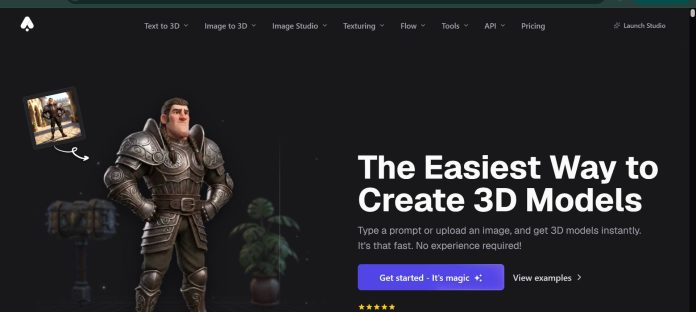
Description
3D AI Studio is a browser-based platform for generating 3D models from text or images, built around a multi-model approach rather than one proprietary engine — it gives access to models like Tripo 3D alongside its own tools. A user can go straight from a text prompt to a 3D model, or first generate and refine a reference image in Image Studio (which includes 100+ AI tools and 15+ image models) before converting it to 3D, a workflow the platform recommends since image generation costs a fraction of what 3D generation does. Beyond generation, the platform covers texturing with PBR materials, rigging and animation, and export to formats like GLB, OBJ, FBX, STL, and USDZ, plus an API and a visual pipeline builder called Flow for chaining steps together.
Key Features
- Multi-model access — generates through models like Tripo 3D alongside 3D AI Studio’s own tools, instead of one fixed engine.
- Image Studio — 100+ AI tools and 15+ image models for creating and refining a 2D reference before converting it to 3D.
- Text to 3D and Image to 3D — generates a 3D model directly from a written prompt or an uploaded image.
- Texturing — paints AI-generated textures and PBR materials directly onto a model.
- Rigging and animation — adds bones and preset or custom animations to bring a model to life.
- Flow — a visual pipeline builder for chaining prompts, edits, and 3D generation into a repeatable one-click flow.
How It Works
A user can type a prompt directly into Text to 3D for fast, rough results, but the platform recommends starting in Image Studio instead: generate and edit a 2D reference image using the same prompt, since image generation costs roughly a thirtieth of what 3D generation does, then convert the finished image to 3D once it matches the intended look. From there, a model can be textured with AI-generated PBR materials, split into logical pieces, rigged with bones, and animated using preset or custom motion. Finished models export in formats like GLB, OBJ, FBX, STL, and USDZ, and repeatable multi-step workflows can be built visually in Flow or automated through the API.
Technical Architecture & Overview
- Core Engine: A multi-model platform, including Tripo 3D (text-to-3D, image-to-3D, multiview-to-3D) alongside 3D AI Studio’s own tools.
- Deployment: Browser-based, no installation required.
- API Surface: REST API for 3D generation (e.g. Tripo text-to-3D and image-to-3D endpoints), plus the visual Flow pipeline builder.
- Known Limits: 3D generation consumes significantly more credits than image generation, making the image-first workflow the more credit-efficient path.
Pros & Cons
| Pros | Cons |
|---|---|
| Multi-model access means a user isn’t limited to a single 3D generation engine. | 3D generation costs far more credits than image generation, requiring a deliberate workflow to manage costs. |
| The image-first workflow gives more control before committing credits to a full 3D generation. | Getting the best results means learning the recommended image-to-3D workflow rather than just typing a prompt. |
| Texturing, rigging, and animation are all handled in the same workspace as generation. | Team workspace and shared projects are reserved for the top Pro tier. |
| Flow lets a repeatable multi-step pipeline run with one click instead of manual steps each time. | Export formats and generation speed both scale with plan tier. |
| A free trial is available with no credit card required. | Higher-volume production work requires the Studio or Pro plan. |
Pricing
| Plan | Price |
|---|---|
| Basic | $12/month billed annually (1,000 credits/month) |
| Studio | $23/month billed annually (3,500 credits/month) |
| Pro | $139/month billed annually (18,000 credits/month) |
Platform Availability
Web | API
Best For
Creators wanting access to multiple 3D generation models in one workspace | Teams needing texturing, rigging, and animation alongside generation | Developers automating 3D generation via the API or Flow
Similar Tools in This Directory
Also worth comparing: Meshy AI, a text and image to 3D model generator with auto-rigging and a developer API | Hyper3D, a native 3D generative AI model with enterprise SSO and team collaboration | Pika AI, a text and image to video generator with playful transformation effects
Visit Official Website
Frequently Asked Questions
Does 3D AI Studio have a free plan?
3D AI Studio offers a free trial to test selected features with no credit card required, according to 3D AI Studio’s official pricing page.
How much does 3D AI Studio cost?
Paid plans start at $12/month billed annually on Basic and go up to $139/month billed annually on Pro, according to 3D AI Studio’s official pricing page.
Can I generate 3D models from text on 3D AI Studio?
Yes, though the platform recommends starting with a generated and refined reference image in Image Studio first, since image generation uses far fewer credits than direct text-to-3D generation, according to 3D AI Studio’s official documentation.
What 3D models does 3D AI Studio use?
3D AI Studio gives access to multiple 3D generation models, including Tripo 3D, alongside its own tools, rather than relying on a single proprietary engine, according to 3D AI Studio’s official site.
Does 3D AI Studio have an API?
Yes. It offers a REST API for 3D generation along with Flow, a visual pipeline builder for chaining generation steps together, according to 3D AI Studio’s official documentation.





