
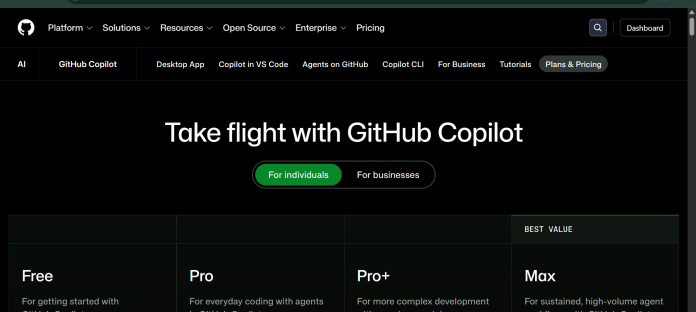
Description
GitHub Copilot is an AI pair programmer from GitHub that provides code completions and chat assistance directly inside the editor, the command line, and GitHub.com. It suggests whole lines or entire functions as developers type, and its chat interface can explain code, answer questions, and make edits across a project. Copilot’s cloud agent can independently research, plan, and write code for an assigned task, opening a pull request for review, while Copilot code review checks pull requests automatically. Paid plans give access to a broad model catalog spanning Anthropic, OpenAI, Google, and Kimi, selectable per task. GitHub Copilot integrates with Visual Studio Code, Visual Studio, JetBrains IDEs, Neovim, Xcode, and other editors, plus GitHub Mobile and a terminal CLI. It suits individual developers, freelancers, students, and engineering teams already building on GitHub who want AI assistance built into their existing workflow rather than a separate tool.
Key Features
- Code completions — suggests whole lines or entire functions as you type, unlimited on paid plans.
- Copilot Chat — ask coding questions and request edits from a chat interface in the IDE, CLI, or GitHub.com.
- Cloud agent — assign work to Copilot to independently research, plan, and write code, with or without a pull request.
- Copilot code review — automated pull request reviews and file diff reviews in supported editors.
- Copilot CLI — use Copilot from the terminal, including delegating tasks to coding agents.
- Third-party agent access — delegate tasks to Claude by Anthropic and OpenAI Codex from within Copilot (Pro+ and Max only).
- MCP integration — connect external tools and data sources through the Model Context Protocol.
How It Works
GitHub Copilot installs as an extension in supported editors like Visual Studio Code, JetBrains IDEs, Visual Studio, or Neovim, and is also accessible through GitHub.com, GitHub Mobile, and a terminal CLI. As a developer types, Copilot suggests completions based on the surrounding code and open files. Copilot Chat answers questions and can make edits directly, while agent mode plans and executes larger changes across multiple files. The cloud agent goes further, taking an assigned task and independently researching, planning, and writing code, then opening a pull request for review. Usage beyond code completions draws on a monthly allowance of GitHub AI Credits (1 credit = $0.01), consumed by chat, agent mode, code review, and CLI use depending on the model selected; code completions themselves never consume credits and stay unlimited on every paid plan.
Technical Architecture & Overview
- Core Engine: Not one proprietary model. The catalog spans Anthropic (Claude Haiku 4.5 through Opus 4.8, Fable 5), OpenAI (GPT-5 mini through GPT-5.6 Sol/Terra/Luna), Google (Gemini 2.5 Pro through 3.6 Flash), and Kimi K2.7 Code, with the same model list available on every individual plan (Free, Pro, Pro+, Max).
- Deployment: Extension-based in supported IDEs, plus GitHub.com, GitHub Mobile, and a terminal CLI; cloud agent tasks run on GitHub-managed infrastructure.
- API Surface: Copilot CLI, MCP server integration, GitHub Actions for automation, and delegation to third-party agents (Claude Code, OpenAI Codex) on Pro+ and Max plans only.
- Known Limits: Free plan is limited to 2,000 completions and 50 chat requests per month, per GitHub’s own FAQ. GitHub may use Free, Pro, and Pro+ interaction data (prompts, suggestions, code snippets) to train its models unless a user opts out in account settings; Business and Enterprise data is never used for training.
Pros & Cons
| Pros | Cons |
|---|---|
| Free plan available with 2,000 completions and 50 chat requests per month, no credit card required | Individual plan data (Free, Pro, Pro+) may be used to train GitHub’s models by default unless a user opts out |
| Broad model catalog spanning Anthropic, OpenAI, Google, and Kimi, identical across all four individual plans | Third-party agent delegation (Claude Code, OpenAI Codex) requires Pro+ or Max, not Pro |
| Cloud agent can independently research, plan, write code, and open a pull request from Pro upward | IP indemnity, SAML SSO, and usage metrics are not included on any individual plan, only Business or Enterprise |
| Natively integrated into GitHub.com, GitHub Mobile, and a wide range of IDEs | Usage beyond code completions draws down a monthly AI Credits allowance that varies by model and task complexity |
| Code completions and next edit suggestions never consume credits and stay unlimited on every paid plan | Max, the top individual tier, costs $100 per user per month, a large step up from Pro+ |
Pricing
| Plan | Price |
|---|---|
| Free | $0/month (2,000 completions, 50 chat requests, Copilot CLI) |
| Pro | $10/user/month ($15/month total AI Credits; unlimited completions; cloud agent and code review) |
| Pro+ | $39/user/month ($70/month total AI Credits; premium models including Opus; third-party agent delegation; audit logs) |
Platform Availability
VS Code | Visual Studio | JetBrains | Neovim | Xcode | Eclipse | CLI | GitHub Mobile
Best For
Individual developers | Engineering teams | Students and educators | Open source maintainers | Enterprises
Frequently Asked Questions
Is GitHub Copilot free to use?
Yes. The Free plan costs $0 per month and includes 2,000 completions, 50 chat requests, and Copilot CLI access, with no credit card required, per GitHub’s official plans page.
What is the Max plan and who is it for?
Max costs $100 per user per month and is built for sustained, high-volume agent workflows, including $200 in monthly total AI Credits and priority access to new models and features, according to GitHub’s official pricing page.
Can Copilot delegate tasks to other AI coding agents?
Yes. Pro+ and Max plans can delegate tasks to third-party agents, including Claude by Anthropic and OpenAI Codex, directly from GitHub Copilot, according to GitHub’s plan comparison table.
Does GitHub Copilot use my code to train its models?
For Free, Pro, and Pro+ subscribers, GitHub may use prompts, suggestions, and code snippets to train and improve its models unless the user opts out in account settings; Business and Enterprise data is never used for training, per GitHub’s official FAQ.
How does GitHub Copilot differ from Cursor?
GitHub Copilot ships primarily as an extension inside existing editors and GitHub.com, while Cursor is a full AI-native editor forked from VS Code with its own cloud agent infrastructure. Both support multiple underlying AI models.
Similar Tools in This Directory
Also in this category: Cursor, AI-native code editor with cloud agents | Claude Code, Anthropic’s terminal-first agentic coding tool | OpenAI Codex, ChatGPT-bundled multi-agent coding tool | Kimi Code, Moonshot’s terminal coding agent with subagents and swarm mode | Sweep, AI coding built specifically for JetBrains





