
Description
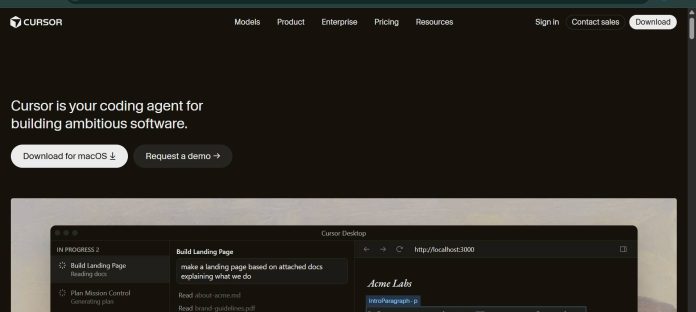
Cursor is an AI-native code editor and coding agent built by Anysphere for writing, editing, and shipping software faster. It runs as a desktop application forked from Visual Studio Code, with an agent that can plan an approach, edit multiple files, and run commands to complete a task end to end. Cloud agents work on Cursor’s own infrastructure in parallel, handling tasks that run for hours or days, while Automations let teams schedule agents to handle recurring work like fixing CI failures. Cursor supports models from OpenAI, Anthropic, Google, xAI, and its own Composer family, so developers can choose the model that fits a task. Bugbot reviews pull requests automatically, and Cursor integrates with Slack, GitHub, and Model Context Protocol servers. It suits individual developers, engineering teams, and enterprises that want an AI-first editor built around autonomous agents rather than isolated autocomplete.
Key Features
- Autonomous agents — plan, edit multiple files, and run commands to complete a task end to end.
- Cloud agents — work independently on Cursor’s infrastructure for hours or days across parallel tasks.
- Automations — schedule always-on agents triggered by events like a failing CI build.
- Cursor CLI — run agents from any terminal or script with
cursor-agent. - Multi-model access — choose from OpenAI, Anthropic, Google, xAI, and Cursor’s own Composer models.
- Bugbot — agentic code review that runs automatically on pull requests.
- Team integrations — connects to Slack, GitHub, and external tools through MCP.
How It Works
Cursor runs as a desktop application built on a fork of Visual Studio Code, with agent access also available through a CLI, an iOS app, and a Slack integration. Inside the editor, developers can request a targeted edit or hand a larger task to an agent, which plans an approach, edits files across the codebase, and reports back with a diff for review. Cloud agents run tasks on Cursor’s own infrastructure, working in parallel across a codebase for extended periods rather than one exchange at a time. Automations let teams set agents to run on a schedule or a trigger, such as fixing a failing CI build on a specific branch. Model choice is flexible, spanning OpenAI, Anthropic, Google, xAI, and Cursor’s own Composer models depending on the task.
Technical Architecture & Overview
- Core Engine: Not one proprietary model by default; supports OpenAI, Anthropic, Google, xAI, and Cursor’s own Composer family, selectable per task. Pro+ includes 3x Pro’s Agent limits and Ultra includes 20x, on the same model catalog.
- Deployment: Desktop application for macOS, Windows, and Linux, plus a CLI, an iOS app, and cloud-hosted infrastructure for cloud agents and automations.
- API Surface: Cursor CLI (
cursor-agent), Slack and GitHub integrations, and Model Context Protocol (MCP) support for connecting external tools. - Known Limits: Each plan includes a set amount of model usage; usage beyond that is billed in arrears, per Cursor’s official pricing FAQ. Context window and rate limits depend on the model selected rather than one fixed figure.
Pros & Cons
| Pros | Cons |
|---|---|
| Multi-model access across OpenAI, Anthropic, Google, xAI, and Cursor’s own Composer models | Enterprise pricing is custom and not published as a flat rate |
| Cloud agents can work independently for hours or days across parallel tasks | On-demand usage beyond plan limits is billed in arrears, which can make costs less predictable |
| Free Hobby plan available with no credit card required | Teams plan starts at $40 per user per month, double the Individual Pro tier |
| Automations let teams run always-on agents triggered by schedule or event | Bugbot code review usage is billed separately even on paid plans |
| Available on macOS, Windows, and Linux, plus CLI and iOS | Exact context window varies by the model selected rather than one published figure |
Pricing
| Plan | Price |
|---|---|
| Hobby | Free (no credit card required; limited Agent requests; access to Composer) |
| Pro (Individual) | $20/month (extended Agent limits, frontier models, MCPs, skills, hooks, cloud agents) |
| Teams | $40/user/month (centralized billing, team marketplace, agentic code review, SSO) |
Platform Availability
macOS | Windows | Linux | CLI | iOS
Best For
Software developers | Engineering teams | Startups | Enterprises | DevOps automation
Frequently Asked Questions
Does Cursor have a free plan?
Yes. The Hobby plan is free with no credit card required, and includes limited Agent requests and access to Composer, per Cursor’s official pricing page.
What is the difference between Individual and Teams plans?
Individual plans (Pro, Pro+, Ultra) start at $20 per month for one person, while Teams starts at $40 per user per month and adds centralized billing, a team marketplace, and SSO.
Which AI models does Cursor support?
Cursor supports models from OpenAI, Anthropic, Google, xAI, and its own Composer family, letting developers choose a model per task rather than being locked to one provider.
How does Cursor differ from GitHub Copilot?
Cursor is a full AI-native code editor forked from VS Code with autonomous cloud agents, while GitHub Copilot ships primarily as an extension inside existing editors. Both support multiple underlying AI models.
What happens when I exceed my plan’s included usage?
On-demand usage continues to work after the included amount is consumed, and is billed in arrears, according to Cursor’s official pricing FAQ.
Similar Tools in This Directory
Also in this category: GitHub Copilot, editor-native AI pair programmer | Claude Code, Anthropic’s terminal-first agentic coding tool | OpenAI Codex, ChatGPT-bundled multi-agent coding tool | Kimi Code, Moonshot’s terminal coding agent with subagents and swarm mode | Sweep, AI coding built specifically for JetBrains





